
August-September developments
This September, Microsoft Teams is introducing a set of updates and new features. One of the standout features is personal meeting templates. Users can now create and save templates for their most common meeting types—whether it is a one-on-one, a client call, or a support session.

Another enhancement is the lobby chat, which allows organisers to send one-way messages to attendees waiting in the lobby. This ensures external participants receive timely instructions or updates before the meeting begins.
In addition, Teams now lets participants edit their display names during a meeting. This flexibility supports preferred names, role identifiers such as ‘Moderator’ or ‘Interpreter’, and more inclusive self-representation.
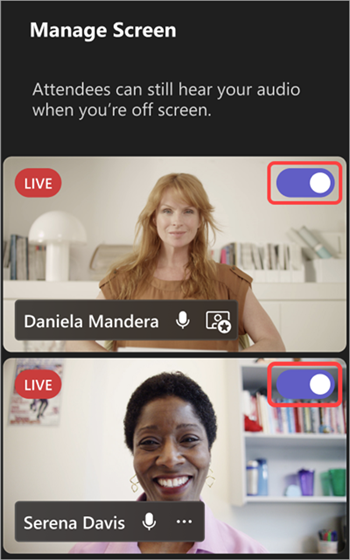
The new feature allows organisers, by using the ’Manage what attendees see’ tool, to alter the screen with specific layouts, backdrops, and name tags, thereby improving their Teams town hall presentations.
Google Meet has introduced several feature changes. One key update is the retirement of legacy Duo calling features. By the end of September, older options such as Family Mode, Moments, and Knock Knock will no longer be supported, as Google fully transitions to a native Meet calling experience.
Google is also presenting automatic room check-in via Companion Mode. Using ultrasound proximity detection, laptops can now automatically detect Meet-enabled conference hardware and prompt users to join in Companion Mode.
Another major step forward is the introduction of AI-powered speech translation through Gemini integration. Initially in beta, this feature enables near real-time translation of spoken English into Spanish, with additional languages.
Zoom’s AI Companion has been upgraded this month with new agentic AI capabilities, transforming it from a passive assistant into an active collaborator that can manage tasks, schedule follow-ups, and automatically generate documents. With features like Zoom Tasks, meeting agendas, and live meeting notes, workflows are streamlined through real-time detection of action items and instant support.
When scheduling meetings, AI Companion now helps resolve time and date conflicts by monitoring participant availability, identifying optimal times, and coordinating with conflicting invitees via email or team chat, while keeping hosts informed through notifications and progress tracking in the AI Companion panel.
Joining personal meeting rooms has also become more efficient, as the system now distinguishes between overlapping personal link names, ensuring users enter the correct meeting while maintaining privacy and account security. Additionally, co-hosts and alternative hosts can now access and manage cloud recordings and AI-generated meeting summaries, provided the feature is enabled in settings, while account owners and admins can control permissions at both account and group levels in the web portal under the Meeting tab.
Are you planning an online meeting or event and need urgent advice?

Our ConfTech Help desk provides countries and organisations with immediate advice on how to organise and run online meetings and events. Get in touch with us at [email protected].
Stay up to date!
Subscribe to ConfTech Monthly Digest to receive updates and trends on the future of meetings.
The latest from Diplo and GIP
Tailor your subscription to your interests, from updates on the dynamic world of digital diplomacy to the latest trends in AI.
Subscribe to more Diplo and Geneva Internet Platform newsletters!
Diplo: Effective and inclusive diplomacy
Diplo is a non-profit foundation established by the governments of Malta and Switzerland. Diplo works to increase the role of small and developing states, and to improve global governance and international policy development.

