
September-October developments
This November, Teams, Google Meet, and Zoom have received a slew of updates and news about new features and options that have significantly improved and simplified the use of these services.

Town halls and webinars now support Full HD (1080p) streaming for Teams Premium or structured meetings. Meanwhile, Teams Rooms on Windows offer multiple camera views with IntelliFrame, enabling a dynamic display of both the presenter and the audience.
On Android-based Teams Rooms devices, live captions can be translated into more than 40 languages. Additionally, users can now join town halls or webinars as attendees directly from Teams Rooms devices, simplifying participation in large-scale events.
AI capabilities are expanding as well. The new Facilitator Agent in Teams Rooms can capture real-time notes, follow-ups, and automatically manage timing.
Microsoft Teams is introducing Audio Recap, a feature that converts meeting summaries into audio, allowing users to stay informed hands-free while on the go. Users can generate recaps for up to eight meetings and choose from three delivery styles: Newscast (a concise summary by one AI speaker), Executive (an efficient overview by two AI speakers), and Casual (a summary with added context by two AI speakers). All recaps are accessible from the meeting recap page on both desktop and mobile.
Microsoft is also launching the ‘Chat with anyone via email’ feature, enabling external participants to join or communicate without a full Teams account.
In Teams Rooms on Windows and Android, when a user is invited as a meeting presenter, the front-of-room display defaults to the attendee view. Presenters retain full control from the console, including managing the green room and off-stage participants, and can switch the front-of-room display to presenter view without affecting what attendees see.
Google Meet now offers access to the full emoji library for reactions. These reactions allow participants to engage with meeting content.
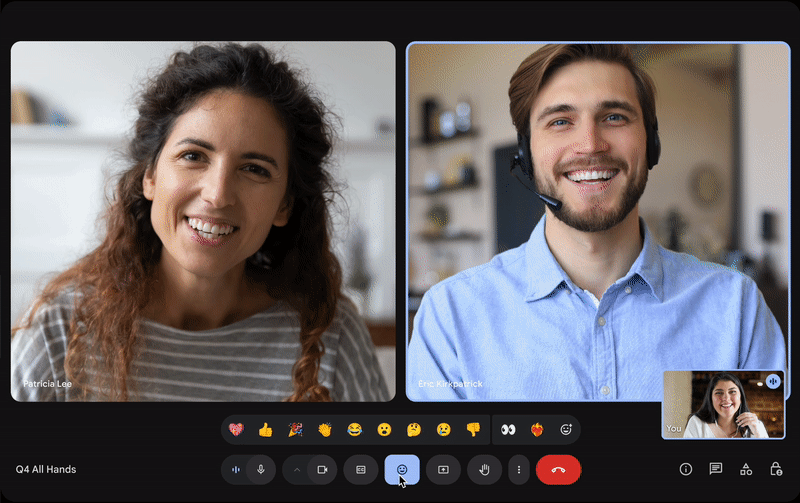
Starting in November, in-meeting messages in Google Meet will be powered by Google Chat. This integration ensures that feedback, key links, and shared resources from the meeting remain accessible to attendees after the meeting in a shared Chat conversation.
Google Meet have new feature a visible countdown timer on its web version, helping hosts and participants stay on schedule during meetings. The waiting-room experience has also been improved, giving hosts and co-hosts greater control by holding participants before entry, sending one-way announcements.
Zoom account owners, admins, and users can now generate meeting agendas using AI Companion via the web portal. A “Generate Agenda” button appears when scheduling meetings in the Zoom Workplace app.
Hosts and co-hosts can also create and edit Smart Name Tags from Zoom Rooms during meetings, with changes syncing across captions, transcripts, AI Companion, and cloud recordings.
Participants can also create and update tasks directly from the in-meeting chat using the new Tasks option, converting chat discussions into actionable items without leaving the meeting.
Are you planning an online meeting or event and need urgent advice?

Our ConfTech Help desk provides countries and organisations with immediate advice on how to organise and run online meetings and events. Get in touch with us at [email protected].
Stay up to date!
Subscribe to ConfTech Monthly Digest to receive updates and trends on the future of meetings.
The latest from Diplo and GIP
Tailor your subscription to your interests, from updates on the dynamic world of digital diplomacy to the latest trends in AI.
Subscribe to more Diplo and Geneva Internet Platform newsletters!
Diplo: Effective and inclusive diplomacy
Diplo is a non-profit foundation established by the governments of Malta and Switzerland. Diplo works to increase the role of small and developing states, and to improve global governance and international policy development.


